Nice snippet for people who are creating xslt sheets in SharePoint:
<xsl:for-each select="./@*">
<xsl:value-of select="name()"></xsl:value-of>
<xsl:value-of select="."></xsl:value-of>
</xsl:for-each>
Wednesday, 7 December 2011


Thursday, 3 November 2011
Farm administrator can't add new web application or extend/delete an existing one
Case
I was working on a fresh VM installation, installing and configuring my SharePoint Environment. Unfortunately I stumbled on the problem not being able to remove the default
Web Application or creating a new one.

Problem
I started checking if all my permissions where sufficient. I checked Farm Administrators, WPG roles, Config Wizard, SQL Permissions, but it didn’t make any difference.
Solution
As a last resort I starting checking my client settings. It didn’t make sense how, but this was where the solution was hiding.
I assumed that, because some functions worked and some didn’t, that the page worked as expected. There were no script errors or messages from IE 9 that things didn’t work proper. Apparently execution or loading some active x or script was being blocked, because the page worked fine after applying some changed settings and restarting IE:
I noticed that the Uri of the Web application was a ‘trusted sites’, thought
it was running on my local machine. I added the Uri to the correct internet
security policy. Just go to internet options, click security tab, remove the Uri
from 'trusted sites' and add it to 'local intranet'.
Monday, 8 August 2011
Deploying Site Templates in the Solution Gallery
Case
I downloaded a couple of site templates from the Solution Gallary of my SharePoint Portal.
I want to put these site templates in a Solution Package so I can easily deploy them in my development enviroments.
I just want to deploy the solution, go to my site collection and greate the subpages I need.
Problem
After putting the file in the correct location (_catalogs/solutions) in my site collection, I noticed I couldn't activate the templates. Activating the templates is necessary to be able to select the template while creating a new site.
Solution
The following solution turned out to work for me:
- Create a new Module in VS2010.
- Add the site templates to your Module.
- Add an eventreceiver to the feature and uncomment 'FeatureActivated'
I downloaded a couple of site templates from the Solution Gallary of my SharePoint Portal.
I want to put these site templates in a Solution Package so I can easily deploy them in my development enviroments.
I just want to deploy the solution, go to my site collection and greate the subpages I need.
Problem
After putting the file in the correct location (_catalogs/solutions) in my site collection, I noticed I couldn't activate the templates. Activating the templates is necessary to be able to select the template while creating a new site.
Solution
The following solution turned out to work for me:
- Create a new Module in VS2010.
- Add the site templates to your Module.
[Module Name="Templates" List="121" Url="_catalogs/solutions"]
[File Path="Templates\Template_Name.wsp" Url="Template_Name.wsp" Type="GhostableInLibrary"]
[Property Name="ContentType" Value="Solution Gallery" /]
[Property Name="SolutionTitle" Value="Template Name" /]
[Property Name="SolutionDescription" Value="Standard Template" /]
[/File]
[/Module]
* Replace [ and ] signs with less than (<) and greater than (>) signs.
- Add an eventreceiver to the feature and uncomment 'FeatureActivated'
SPSite currentSite = (SPSite)properties.Feature.Parent;
// Get all names of added solutions
ListsolutionName = new List ();
SPUserSolutionCollection solutionsCollection = currentSite.Solutions;
foreach (SPUserSolution solution in currentSite.Solutions)
{
string name = solution.Name;
if (!solutionName.Contains(name))
{
solutionName.Add(name);
}
}
// Add new solutions to the collection of the gallery
SPDocumentLibrary solutionsGallery = (SPDocumentLibrary)currentSite.GetCatalog(SPListTemplateType.SolutionCatalog);
foreach (SPListItem item in solutionsGallery.Items)
{
if (!solutionName.Contains(item.Name))
{
solutionsCollection.Add(item.ID);
}
}
// Properly activate solutions
SPFeatureCollection featureCollection = currentSite.Features;
foreach (SPUserSolution solution in solutionsCollection)
{
Guid solutionId = solution.SolutionId;
SPFeatureDefinitionCollection siteFeatures = currentSite.FeatureDefinitions;
var features = from SPFeatureDefinition f in siteFeatures
where f.SolutionId.Equals(solutionId) && f.Scope == SPFeatureScope.Site
select f;
foreach (SPFeatureDefinition featureDefinition in features)
{
SPFeature foundFeature = featureCollection[featureDefinition.Id];
if (foundFeature == null)
currentSite.Features.Add(featureDefinition.Id, false, SPFeatureDefinitionScope.Site);
}
}
Friday, 8 July 2011
Redirecting userdisp.aspx to custom User Profile Page
Case
Because we are building a custom User Profile Page to display custom properties, we wanted to redirect the /_layouts/userdisp.aspx request to our custom LayoutsPage. This request is the default request of SharePoint to the built-in Profile Page.
Problem
The /_layouts/groups.aspx displays all groups in a collection. When you click on the groupname to display all members, it sends you to the /_layouts/userdisp.aspx which will redirect you to the correct /_layouts/people.aspx?MembershipGroupId.
Our /_layouts/userdisp.aspx should do the same, but how does SharePoint determine when it needs to show a group or user?
Solution
The solution could be found in the Microsoft.SharePoint.ApplicationPages.dll and original userdisp.aspx file.
In your SharePoint solution create a new application page. Make sure it's mapped to the /_layouts/ folder.
In your .aspx file
Add this control to the ContentPlaceHolder 'PlaceHolderMain':
Because we are building a custom User Profile Page to display custom properties, we wanted to redirect the /_layouts/userdisp.aspx request to our custom LayoutsPage. This request is the default request of SharePoint to the built-in Profile Page.
Problem
The /_layouts/groups.aspx displays all groups in a collection. When you click on the groupname to display all members, it sends you to the /_layouts/userdisp.aspx which will redirect you to the correct /_layouts/people.aspx?MembershipGroupId.
Our /_layouts/userdisp.aspx should do the same, but how does SharePoint determine when it needs to show a group or user?
Solution
The solution could be found in the Microsoft.SharePoint.ApplicationPages.dll and original userdisp.aspx file.
In your SharePoint solution create a new application page. Make sure it's mapped to the /_layouts/ folder.
In your .aspx file
Add this control to the ContentPlaceHolder 'PlaceHolderMain':
[SharePoint:FormComponent id="UserListForm" TemplateName="UserListForm" ControlMode="Display" runat="server"/] (replace [ to make it a tag ;-)
In your .cs file
Add the following code to Page_Load:
int result = 0;
string url = "User/UserProfile.aspx?" + base.Request.QueryString.ToString();
if (base.Request.QueryString["ID"] != null)
{
if (!int.TryParse(base.Request.QueryString["ID"], out result) || (result <= 0))
{
throw new SPException(SPResource.GetString("InvalidQueryString", new object[] { "ID" }));
}
}
else
{
result = base.Web.CurrentUser.ID;
if (result <= 0)
{
throw new SPException(SPResource.GetString("InvalidQueryString", new object[] { "ID" }));
}
this.UserListForm.ItemId = result;
}
this.UserListForm.ListId = base.Web.SiteUserInfoList.ID;
SPListItem listItem = this.UserListForm.ListItem;
SPContentTypeId id = (SPContentTypeId)listItem["ContentTypeId"];
if (SPBuiltInContentTypeId.SharePointGroup.IsParentOf(id))
{
url = "people.aspx?MembershipGroupId=" + listItem.ID.ToString(CultureInfo.InvariantCulture);
string keyOrValueToEncode = base.Request.QueryString["Source"];
if (keyOrValueToEncode != null)
{
url = url + "&Source=" + SPHttpUtility.UrlKeyValueEncode(keyOrValueToEncode);
}
}
SPUtility.Redirect(url, SPRedirectFlags.RelativeToLayoutsPage, this.Context);
}
This should do the trick!
Wednesday, 2 February 2011
List Error when picking SiteTemplate - 0x81020012
Case
We were creating a new site definition for a customer build up with elements of the new SharePoint 2010 Features in Visual Studio 2010. At some point the solution started trowing errors when choosing the Site Template with the template picker:

Problem
After analyzing the problem we discovered that VS2010 what deploying the Template Files to ‘14-hive \ Template \ Solution’ instead of ‘14-hive \ Template \ SiteTemplates \ Solution \ xml’. This way, since the webtemp_*.xml was deployed correctly, it was possible to choose the template in the template picker. When selected, SharePoint couldn’t find the onet.xml-file.
If this onet.xml-file is missing SharePoint throws this fuzzy ‘list, survey, discussion board, or document library with the specified title already exists’ message. You can test this by throwing away the file from your ‘14-hive \ Template \ SiteTemplates \ Solution \ xml’-directory.
What went wrong?
By default VS2010 knows the onet.xml-file should be located in the ‘14-hive \ Template \ SiteTemplates \ Solution \xml’-directory. Every file you add will be configured to be deployed in this path.
But when you include a new file, in this case my onet.xml, VS2010 sets the path to ‘{SharePointRoot} \ Template \ Solution \ SiteDefinition ’.
Solution
Go back to VS2010 and check the following settings in your site definition:
We were creating a new site definition for a customer build up with elements of the new SharePoint 2010 Features in Visual Studio 2010. At some point the solution started trowing errors when choosing the Site Template with the template picker:

A list, survey, discussion board, or document library with the specified title
already exists in this Web site. Please choose another title. 0x81020012
Problem
After analyzing the problem we discovered that VS2010 what deploying the Template Files to ‘14-hive \ Template \ Solution’ instead of ‘14-hive \ Template \ SiteTemplates \ Solution \ xml’. This way, since the webtemp_*.xml was deployed correctly, it was possible to choose the template in the template picker. When selected, SharePoint couldn’t find the onet.xml-file.
If this onet.xml-file is missing SharePoint throws this fuzzy ‘list, survey, discussion board, or document library with the specified title already exists’ message. You can test this by throwing away the file from your ‘14-hive \ Template \ SiteTemplates \ Solution \ xml’-directory.
What went wrong?
By default VS2010 knows the onet.xml-file should be located in the ‘14-hive \ Template \ SiteTemplates \ Solution \xml’-directory. Every file you add will be configured to be deployed in this path.
But when you include a new file, in this case my onet.xml, VS2010 sets the path to ‘{SharePointRoot} \ Template \ Solution \ SiteDefinition ’.
Solution
Go back to VS2010 and check the following settings in your site definition:
Onet.xml
- Deployment Location:
{SharePointRoot}\Template\SiteTemplates\Csolutions.SharePoint.SalesPortal.Site\Xml\- Deployment Type: TemplateFile
Webtemp_*.xml
- Deployment Location:
{SharePointRoot}\Template\SiteTemplates\Csolutions.SharePoint.SalesPortal.Site\Xml\- Deployment Type: TemplateFile
Re-deploy the solution and recreate the sitecollection with the correct template. This solved the problem for me.
Friday, 28 January 2011
Microsoft.SharePoint.ApplicationPages
So you want to create a silk-layed-out SharePoint Administration page? Then you need to reference the Microsoft.SharePoint.ApplicationPages.dll!
Problem
I was looking for the Microsoft.SharePoint.ApplicationPages assembly, but I couldn't reference it from the assembly cache. Apparently it isn't begin installed in the assembly bin, but in the _app_bin of your web application.
Solution
You can create a (web app undependent) reference to the dll from the following location:
SharePoint 2007: 12-hive\CONFIG\BIN
SharePoint 2010: 14-hive\CONFIG\BIN
Problem
I was looking for the Microsoft.SharePoint.ApplicationPages assembly, but I couldn't reference it from the assembly cache. Apparently it isn't begin installed in the assembly bin, but in the _app_bin of your web application.
Solution
You can create a (web app undependent) reference to the dll from the following location:
SharePoint 2007: 12-hive\CONFIG\BIN
SharePoint 2010: 14-hive\CONFIG\BIN
Monday, 24 January 2011
Programmatically Set Master Page of Publishing Sites
Case
SharePoint Standard has a nice feature that allows configurating the Master Page on a Site Collection Level. This feature presents itself when you enabled the ‘SharePoint Server Publishing Infrastructure’-feature, found in the Site Collection Features.
Now you can use the ‘Site Master Page Settings’ (/_Layouts/ChangeSiteMasterPage.aspx) to set the Site Master Page and System Master Page.
Problem
But what does a Site and System Master Page mean? And how do you set these properties programmatically?
Solution
Site Master Page
This is the master page that is being used by publishing pages. This means that you use an other masterpage for views, etc.
System Master Page
This is the master page that is being used by system pages like settings.aspx, Forms and view pages like the view of document library pages.
The code
SharePoint Standard has a nice feature that allows configurating the Master Page on a Site Collection Level. This feature presents itself when you enabled the ‘SharePoint Server Publishing Infrastructure’-feature, found in the Site Collection Features.
Now you can use the ‘Site Master Page Settings’ (/_Layouts/ChangeSiteMasterPage.aspx) to set the Site Master Page and System Master Page.
Problem
But what does a Site and System Master Page mean? And how do you set these properties programmatically?
Solution
Site Master Page
This is the master page that is being used by publishing pages. This means that you use an other masterpage for views, etc.
System Master Page
This is the master page that is being used by system pages like settings.aspx, Forms and view pages like the view of document library pages.
The code
[Guid("00000000-0000-0000-0000-000000000000")] // Add Guid here
public class
StylingEventReceiver : SPFeatureReceiver
{
public override void FeatureActivated(SPFeatureReceiverProperties properties)
{
if (properties != null
&& properties.Feature != null
&& properties.Feature.Parent != null
&& properties.Feature.Parent.GetType() == typeof(SPSite))
{
SPSite site = (SPSite)properties.Feature.Parent;
using (SPWeb rootWeb = site.RootWeb)
{
rootWeb.AllowUnsafeUpdates = true;
rootWeb.MasterUrl = "/_catalogs/masterpage/v4.customer.master";
rootWeb.CustomMasterUrl = "/_catalogs/masterpage/V4.customer.master";
rootWeb.Update();
rootWeb.AllowUnsafeUpdates = false;
}
}
}
public override void FeatureDeactivating(SPFeatureReceiverProperties properties)
{
if (properties != null
&& properties.Feature != null
&& properties.Feature.Parent != null
&& properties.Feature.Parent.GetType() == typeof(SPSite))
{
SPSite site = (SPSite)properties.Feature.Parent;
using (SPWeb rootWeb = site.RootWeb)
{
rootWeb.AllowUnsafeUpdates = true;
rootWeb.MasterUrl = "/_catalogs/masterpage/v4.master";
rootWeb.CustomMasterUrl = "/_catalogs/masterpage/v4.master";
rootWeb.Update();
rootWeb.AllowUnsafeUpdates = false;
}
}
}
}
Thursday, 10 June 2010
Explorer and test Webservices
Case
I needed to explorer and test a corporate webservice. I needed to know which functionalities the webservice delivers, what kind of parameters the webservice expected and with what kind of responses the webservice replies.
Problem
The webservice wasn't documented and before a wanted to try to make a custom application I looked for a more dynamic solution. I didn't have the time to write a good testing program...
Solution
I learned that the awnser was pretty easy. Just use this handy tool: http://www.codeplex.com/WebserviceStudio
It allows you to explorer webservices easily!

Tuesday, 11 May 2010
Converting Reporting Services (SSRS) rdl from 2005 into 2000
Case
I receive a error when uploading my report.
I made a mistake and created a report in VS2005 instead of VS2003. How could I change this?
Gary Cowan gave a real good tip on : http://sqlservertipsandtricks.blogspot.com/2008/06/converting-reporting-services-ssrs-rdl.html
but it wasn’t really complete for my case. In the end it turned out I had to change the document as following.
Solution
If you want to convert a SSRS rdl from 2005 to 2000, you can try the following
1) Open the .RDL file in a text editor and change the XML.
2) Change the first node to look like this:
I receive a error when uploading my report.
Error number: 0x80048298Problem
Information:
[CrmException: Exception of
type Microsoft.Crm.CrmException was thrown.]
Microsoft.Crm.Application.Platform.Report. InternalCreate(String xml) +721
Microsoft.Crm.Application.Platform.Entity.Create() +109
Microsoft.Crm.Application.Forms.AppForm. RaiseDataEvent(FormEventId eventId)
+408 Microsoft.Crm.Application.Forms.EndUserForm. Initialize(Entity entity) +57
Microsoft.Crm.Application.Forms.EndUserForm. Execute(Entity entity) +13
Microsoft.Crm.Web.Tools.ReportProperty. ReportPropertyPage.ConfigureForm() +202
Microsoft.Crm.Application.Controls.AppPage. OnPreRender(EventArgs e) +30
System.Web.UI.Control.PreRenderRecursiveInternal() +62
System.Web.UI.Page.ProcessRequestMain() +1499
I made a mistake and created a report in VS2005 instead of VS2003. How could I change this?
Gary Cowan gave a real good tip on : http://sqlservertipsandtricks.blogspot.com/2008/06/converting-reporting-services-ssrs-rdl.html
but it wasn’t really complete for my case. In the end it turned out I had to change the document as following.
Solution
If you want to convert a SSRS rdl from 2005 to 2000, you can try the following
1) Open the .RDL file in a text editor and change the XML.
2) Change the first node to look like this:
Report
xmlns=”http://schemas.microsoft.com/sqlserver/reporting/2003/10/reportdefinition”
xmlns:rd=”http://schemas.microsoft.com/SQLServer/reporting/reportdesigner”
3) Do a search for “Interactive” You should find 2 nodes InteractiveWidth and InteractiveHeight. You need to delete these nodes.
4) The XML in the RDL file is different between 2005 and 2000 when you want to pass parameters to a SQL procedure.
In 2000 they pass parameters this way in the RDL file. I used
< Query>
< CommandType> StoredProcedure< /CommandType>
< CommandText> =”procGetInvMovement”< /CommandText>
< QueryParameters>
< QueryParameter Name=”@BegDate”>
< Value> =Parameters!pBegDate.Value< /Value>
< /QueryParameter>
< QueryParameter Name=”@EndDate”>
< Value> =Parameters!pEndDate.Value< /Value>
< /QueryParameter>
< /QueryParameters>
< DataSourceName> JLG SQL< /DataSourceName>
< /Query>
and in 2005 they do it this way:
< Query>
< rd:UseGenericDesigner> true< /rd:UseGenericDesigner>
< CommandText> =”Execute procGetInvMovement ‘” & Parameters!pBegDate.Value & “‘, ‘” & Parameters!pEndDate.Value & “‘”< /CommandText>
< QueryParameters>
< QueryParameter Name=”pBegDate”>
< Value> =Parameters!pBegDate.Value< /Value>
< /QueryParameter>
< QueryParameter Name=”pEndDate”>
< Value> =Parameters!pEndDate.Value< /Value>
< /QueryParameter>
< /QueryParameters>
< DataSourceName> JLG SQL< /DataSourceName>
< /Query>
Notice how they don’t include the parameters in the commandtext tag in 2000
5) Delete the CommandType-tag if you want to use a query
6) In to the 2000 version of the .RDL file. You will need to add this line:
StoredProcedure after the first tag.
7) In the ReportParameters don’t use the tag Hidden
THIS IS NOT SUPPORTED SO I WOULD BACKUP YOUR REPORTS BEFORE ATTEMPTING THIS AND USE THIS ADVICE AT YOUR OWN RISK.
Tuesday, 13 April 2010
Support SharePoint 2007 without SP2 ends on July 13th, 2010
Is your SharePoint 2007 farm already on Service Pack 2? If not, read this!
*** update April 12th, 2010 ***
Microsoft announced that the official retirement date for SP1 is 13th of July!
***
Source: http://blogs.technet.com/stefan_gossner/archive/2010/03/23/updated-retirement-date-for-wss-3-0-and-moss-2007-sp1.aspx
*** update April 12th, 2010 ***
Microsoft announced that the official retirement date for SP1 is 13th of July!
***
Source: http://blogs.technet.com/stefan_gossner/archive/2010/03/23/updated-retirement-date-for-wss-3-0-and-moss-2007-sp1.aspx
I've quoted the blog post of Stefan Goßner about the support of MOSS 2007
installation without SP2.
Please consider this information, if you're
not already planning to upgrade your systems!"Based on the above listed information support for SharePointMore
servers without SP2 will end on April 28th, 2010"
information: http://blogs.technet.com/stefan_gossner/archive/2010/01/07/is-your-sharepoint-2007-farm-already-on-service-pack-2-if-not-read-this.aspx
Monday, 12 April 2010
Content Deployment - 'Bible' - The complete Guide
This time I want to introduce the blog of Stefan Goßner. This man works as a 'Escalation Engineer' for SharePoint. This month Stefan Goßner wrote a beautifull ode about the Content Deployment funtionality of SharePoint 2007:
| Read the 'Bible': The Basics The Basics continued Configuration Communication Quick Deployment Logging Job and Timer job coming soon... coming soon... |
Source: Stefan Goßner
Thursday, 1 April 2010
QNH @ DevDays 2010

I have been to DevDays 2010 this year and it was great!In this post I will tell you which presentations a watched, with some comment on it. I hope it helps you to get interested with some of these great new technologies!
On the 30th and 31th of March 2010 I have visited the following presentations:
Day 1
On the 30th and 31th of March 2010 I have visited the following presentations:
Day 1
- What's new in office 2010 for developers by John R Durant.
He made a video of us during lunch: (view the post) We had a nice chat about culturial differences. - More follows soon!
Geek Night
- Keynote
- More follows soon!
Day 2
- More follows soon!
Thursday, 11 March 2010
Launch date for Office 2010 and SharePoint 2010
Launch date is May 12th, 2010
RTM date will be in April
I hope I can sleep tonight :D
Thursday, 14 January 2010
The resource object with key 'NamexxxField' was not found
Normaly a solution deployment would copy important dll's, resource files etc. to the Global_Resources map in your (inetpub) web applications bin directory. Somehow one of my build SharePoint solutions didn't copied those file during deployment.
I recieved the following message
Source: http://software.sharepointsolutions.com/Community/t/75.aspx
I recieved the following message
Exception Type: System.Web.HttpException Exception Message: The resource object with key 'NamexxxField' was not found.I needed to execute the following command to fix the problem:
"C:\Program Files\Common Files\Microsoft Shared\web serverAfter that SharePoint had copied the files and my solution worked correctly, but my wsp needed futher investigation.
extensions\12\BIN\STSADM.exe" -o copyappbincontent
Source: http://software.sharepointsolutions.com/Community/t/75.aspx
Friday, 8 January 2010
Remove lost/broken Webparts
Previously, I retracted a solution from my web application. The consequence of this action was that I was not able to load the pages anymore. I recieved:
Solution:
Append ?Contents=1 to the webpart page's URL to display the Webpart Maintenance Page. On that page you can delete the malefactor.
Example: http://moss/default.aspx?contents=1
In this case, the only thing you have to do is to remove the webpart. Removing the webpart in the webpart gallery doesn't solve this.Error
An error occurred during the processing of . Could not load file or assembly 'Solution.WebParts, Version=1.0.0.0, Culture=neutral, PublicKeyToken=a7985c93d0151889' or one of its dependencies. The system cannot find the file specified.
Solution:
Append ?Contents=1 to the webpart page's URL to display the Webpart Maintenance Page. On that page you can delete the malefactor.
Example: http://moss/default.aspx?contents=1
Friday, 18 December 2009
MOSS 2007: Jaspers Best Practices
This is a recurring post where I will try to mind-map my ideas about best practices for MOSS 2007. I will update this post every time I think about 'rules' that I find best practice. (Can call that frequently, right? ;-)
Installation
Installation
- Install your Web applications to the WWWRoot. This helps everyone who's searching your Web application root folder.
- When creating a Web application and requirements don't specify a port number to use, use port number 80 and up for custom Web applications. This helps you to remember the port number and recognizing which Web application your working with according to the URL.
- When creating a Web application and requirements don't specify a port number to use, use port number 8080 and up for the Central Administration (CA) , the Shared Service Provider (SSP), My Site sitecollection and other MOSS dependent Web applications. This helps you to remember the port number and recognizing which Web application your working with according to the URL.
- Name your application(pool, etc) after the function or projectname of your Web Application. For example: SharePoint - CA - 8080 instead of SharePoint - 8080. This helps you to recognize the application(pool) in ISS, CA, etc.
- Name your database (DB) after the function or projectname of your Web Application. For example: WSS_Content_Library instead of WSS_Content_xxxxxxxxxxxxxxxxxxxxxxxxx9f7e04a. This helps you and DB managers to recognize the DB.
Server installation
- Install 7-zip. It supports more file types and it's free, so no anoying pop-ups!
Development (tools)
- Use the VSE WSS to easily create SharePoint Projects etc.
- Use custom Definitions if possible, this makes it easier to reproduce your Sites/Pages/Lists/Contenttypes/etc.
- Use SPM2007 to easily retrieve contenttype (etc.) GUIDs and brutaly change the Moss structures.
- Use StsadmWin 2007 to create stsadm commands in a GUI-friendly-matter.
- Use WSPBuilder to build your wsp's.
- Use SharePoint Solution Installer to send to customers. It guides them installing your wsp's.
Content Deployment
- Read 'Content Deployment – The complete' from Stefan Goßner, because it covers a lot of topics about the Content Deployment abilities of SharePoint like configuration, common misunderstandings and issues.
Users
... planned
Sunday, 15 November 2009
List of MOSS 2007 ActiveX Controls
I was looking in to which ActiveX controls are used in SharePoint 2007. I found a pretty interresting post of Jose Barreto. I have summed all his findings in this post.
i Keep in mind that there could be some few misunderstood functions/behavior discribed below, because it's mostly based on self-study by Jose and myself. I have looked at a couple of these controls mentioned by Jose to find out if the post can be trusted. I also worked with a couple of these files in the past, discribed in Message in the Information bar in IE7 & 8 when you browse to a MOSS 2007 site. I have found that the information about these controls is correct. I will mark the once i've checked myself.
DiagramLauncher
Server Files:
TEMPLATE\LAYOUTS\1033\BFORM.JS
TEMPLATE\LAYOUTS\1033\CORE.JS
TEMPLATE\LAYOUTS\1033\INIT.JS
TEMPLATE\LAYOUTS\1033\OWS.JS
Client File:
DGRMLNCH.DLL
Also known as:
-
Function:
Launch Microsoft Office Visio to open diagrams
Reference:
-
Non-IE behavior:
The browser will offer to save the file locally instead of launching the application. The option to "Open with Visio" will not show.
DigitalSignatures
Server Files:
TEMPLATE\LAYOUTS\INC\1033\IntlCoreStrings.js
TEMPLATE\LAYOUTS\INC\Core.js
TEMPLATE\LAYOUTS\INC\intlcorestrings.js
TEMPLATE\LAYOUTS\SignatureDetails.FormServer.aspx
Client Files:
-
Also known as:
-
Function:
Digital Signature for Microsoft Office clients
Reference:
-
Non-IE behavior:
You cannot sign documents, but you can view signatures.
ExportDatabase
Server Files:
TEMPLATE\LAYOUTS\1033\CORE.JS
TEMPLATE\LAYOUTS\viewtype.aspx
TEMPLATE\LAYOUTS\1033\OWS.JS
Client File:
OWSSUPP.DLL
Also Known As:
SharePoint Export Database Launcher
Function:
Export list to a Microsoft Office Access database
Reference:
-
Non-IE behavior:
Option to "Open with Access" will not show.
ListNet (*
Server Files:
TEMPLATE\LAYOUTS\1033\CORE.JS
TEMPLATE\LAYOUTS\1033\OWS.JS
Client File:
STSLIST.DLL
Also Known As:
Microsoft Office List 12.0
Function:
Edit list in Datasheet view; An ActiveX control that works with the ListViewWebPart class to provide users with a datasheet view for editing lists in Windows SharePoint Services.
Reference:
http://msdn2.microsoft.com/en-us/library/ms416795.aspx
Non-IE behavior:
The option to "Edit in Datasheet" will not show.
NameCtrl (*
Server Files:
TEMPLATE\LAYOUTS\1033\INIT.JS
TEMPLATE\LAYOUTS\1033\OWS.JS
Client File:
NAME.DLL
Also Known As:
NameCtrl Class
Function:
Display presence information for people, integrating with Outlook (mail, calendar) and Communicator (instant messaging); A NameCtrl control is an ActiveX control that allows a Web page to display presence information for people, and it allows the user to take various actions with respect to those people through an on-object user interface (UI) in Windows SharePoint Services.
Reference:
http://msdn2.microsoft.com/en-us/library/ms455335.aspx
Non-IE behavior:
Presence information will not show.
OISClientLauncher (*
Server Files:
TEMPLATE\LAYOUTS\1033\IMGLIB.JS
TEMPLATE\LAYOUTS\upload.aspx
Client File:
OISCTRL.DLL
Also Known As:
OSIClientLauncher Class
Function:
Integration with the Office Picture Manager; When you install Microsoft® Windows® SharePoint™ Services on a client computer, an ActiveX control is registered automatically. The ID of the control is "OISCTRL.OISClientLauncher" and it does not have any properties or methods. It is only used to pass on parameters to OIS.exe, the Microsoft Office Picture Manager executable file.
Reference:
http://msdn2.microsoft.com/en-us/library/ms954038.aspx
Non-IE behavior:
Integration with Picture Manager will not show.
OpenDocuments (*
Server Files:
TEMPLATE\LAYOUTS\1033\HtmlEditor.js
TEMPLATE\XML\DOCICON.XML
Client File:
OWSSUPP.DLL
Also Known As:
SharePoint OpenDocuments Class
Function:
Launch Office applications to open documents; An ActiveX control that allows users to create documents based on a specified template, or to edit documents with their associated applications in the context of Microsoft Windows SharePoint Services.
Reference:
http://msdn2.microsoft.com/en-us/library/ms454230.aspx
Non-IE behavior:
The browser will offer to save the file locally instead of launching the application. The option to "Edit In (Microsoft Office application)" will not show.
OpenXMLDocuments (*
Server Files:
TEMPLATE\LAYOUTS\1033\HtmlEditor.js
TEMPLATE\LAYOUTS\INC\Core.js
TEMPLATE\LAYOUTS\ctdmsettings.aspx
TEMPLATE\XML\DOCICON.XML
Client File:
INLAUNCH.DLL
Also Known As:
SharePointOpenXMLDocuments
Function:
Launch InfoPath to open forms; An ActiveX control that allows a user of Microsoft Windows SharePoint Services to create XML documents or forms based on a specified template, or to edit XML documents or forms with their associated applications.
Reference:
http://msdn2.microsoft.com/en-us/library/ms452435.aspx
Non-IE behavior:
The browser will offer to save the file locally instead of launching the application. The option to "Open with InfoPath" will not show.
PersonalSite
Server Files:
-
Client File:
PORTAL~1.DLL
Also Known As:
PersonalSite Class
PortalConnect.PersonalSite
Function:
Adds your my site to a list of SharePoint sites maintained by the Office client
Reference:
-
Non-IE behavior:
No client-side knowledge of where your mysite is located.
Ppactivex
Server Files:
TEMPLATE\CONTROLTEMPLATES\sldlibtemplates.ascx
TEMPLATE\FEATURES\SlideLibrary\SldLib\schema.xml
TEMPLATE\LAYOUTS\1033\SLDLIB.JS
Client Files:
-
Also known as:
-
Function:
Integration with PowerPoint for Slide Library Templates
Reference:
-
Non-IE behavior:
The Slide Library integration with PowerPoint will not work.
RTEDialogHelper (*
Server Files:
TEMPLATE\LAYOUTS\1033\BFORM.JS
TEMPLATE\LAYOUTS\1033\FONTDLG.HTM
TEMPLATE\LAYOUTS\1033\HtmlEditor.js
Client File:
MSHTMLED.DLL
Also Known As:
Rich Text Editor
DlgHelper
HtmlDldSafeHelper Class
Function:
Rich Text Editor used to edit wikis; Rich text web part; Provides access to the color dialog box, block formats, and system fonts collections.
References:
http://msdn2.microsoft.com/en-us/library/ms535238.aspx
Non-IE behavior:
A simpler multi-line text editor with no Rich Text capabilities will show. Consider using the Telerik control, which is available for free download at http://www.telerik.com/sharepoint and works with non-IE browsers.
SpreadsheetLauncher (*
Server Files:
TEMPLATE\LAYOUTS\1033\BFORM.JS
TEMPLATE\LAYOUTS\1033\INIT.JS
TEMPLATE\LAYOUTS\NewTranslationManagement.aspx
TEMPLATE\LAYOUTS\lstsetng.aspx
TEMPLATE\LAYOUTS\new.aspx
TEMPLATE\LAYOUTS\sledit.aspx
TEMPLATE\LAYOUTS\slnew.aspx
Client Files:
OWSSUPP.DLL
OWSCLT.DLL
Also Known As:
SharePoint SpreadSheet Launcher
Function:
Integration with Excel to import and export lists; An ActiveX control that allows a user to import lists from spreadsheets or to verify whether a compatible spreadsheet application is available for list export in Windows SharePoint Services.
Reference:
http://msdn2.microsoft.com/en-us/library/ms427792.aspx
Non-IE behavior:
Options to Export to Excel and Import Spreadsheet will not show. If you register an application to handle the .iqy extension, you might be able to export spreadsheets.
Stssync (*
Server Files:
TEMPLATE\LAYOUTS\1033\BFORM.JS
TEMPLATE\LAYOUTS\1033\INIT.JS
Client File:
OWSSUPP.DLL
Also Known As:
SharePoint Stssynch Handler
Function:
Connect to Outlook to synchronize lists; Provides a method for returning the name of the application used to synchronize events lists and contacts lists in Microsoft Windows SharePoint Services with a messaging application such as Microsoft Office Outlook2007.
Reference:
http://msdn2.microsoft.com/en-us/library/ms456225.aspx
Non-IE behavior:
Option to "Connect to Outlook" will not show. You should be able register a client application to handle the stssync:// protocol.
UploadCtl (*
Server Files:
TEMPLATE\CONTROLTEMPLATES\DefaultTemplates.ascx
TEMPLATE\LAYOUTS\1033\BFORM.JS
TEMPLATE\LAYOUTS\1033\INIT.JS
TEMPLATE\LAYOUTS\copy.aspx
TEMPLATE\LAYOUTS\updatecopies.aspx
TEMPLATE\LAYOUTS\upload.aspx
TEMPLATE\XML\FLDTYPES.XML
Client File:
STSUPLD.DLL
Also Known As:
STSUpld UploadCtl Class
Function:
Multiple File Upload; Allows multiple documents to be uploaded from an external application to a document library on a site in Microsoft Windows SharePoint Services.
Reference:
http://msdn2.microsoft.com/en-us/library/ms456628.aspx
Non-IE behavior:
Only single file upload is available. Option for "Multiple File Upload" will not show.
(* Checked by hand or through reference.
Sunday, 1 November 2009
Web application installation path
As you probably know, by default, WSS Web applications are physically created in the 'C:\Inetpub\wwwroot\wss\VirtualDirectories'-directory. This directory is used as default path in one of the fields in the 'Create a new Web application' form.
When you want to place the Web application in an other virtual-directory you need to change this field before creating the Web application. If you don’t, you need to recreate the Web application again.
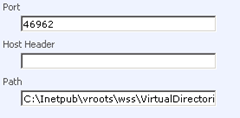
Windows SharePoint Services 3.0 derives the directory information from the Web server registry setting at 'HKEY_LOCAL_MACHINE\SOFTWARE\Microsoft\InetStp\PathWWWRoot', this path is subsequently appended with '\wss\VirtualDirectories'. To ensure Web applications are installed on the proper disk volume, modify the Registry values on your Web front-end computers to reference the desired path.
The Registry values can be modified either prior to or after Windows SharePoint Services 3.0/Microsoft Office SharePoint Server 2007 has been installed. However, any pre-existing Web applications will not be changed (as discussed early in the post). Here’s what you have to do to change the Registry Values.
Configure the WWWRoot Default Path (Windows Server 2003)
Please take appropriate considerations when you consider changing the virtual-directory path.
When you want to place the Web application in an other virtual-directory you need to change this field before creating the Web application. If you don’t, you need to recreate the Web application again.

Windows SharePoint Services 3.0 derives the directory information from the Web server registry setting at 'HKEY_LOCAL_MACHINE\SOFTWARE\Microsoft\InetStp\PathWWWRoot', this path is subsequently appended with '\wss\VirtualDirectories'. To ensure Web applications are installed on the proper disk volume, modify the Registry values on your Web front-end computers to reference the desired path.
The Registry values can be modified either prior to or after Windows SharePoint Services 3.0/Microsoft Office SharePoint Server 2007 has been installed. However, any pre-existing Web applications will not be changed (as discussed early in the post). Here’s what you have to do to change the Registry Values.
Configure the WWWRoot Default Path (Windows Server 2003)
- Click Start, and then select Run…
- In the Open field enter Regedit and click OK.
- Locate the 'HKEY_LOCAL_MACHINE\SOFTWARE\Microsoft\InetStp' key and modify the PathWWWRoot Value data to 'D:\Inetpub\vroots'.
- Locate the 'HKEY_LOCAL_MACHINE\SYSTEM\ControlSet001\Control\ContentIndex\Catalogs\Web key' and modify the Location Value data to 'D:\inetpub'.
- Locate the 'HKEY_LOCAL_MACHINE\SYSTEM\ControlSet003\Control\ContentIndex\Catalogs\Web key' and modify the Location Value data to 'D:\inetpub'.
- Locate the 'HKEY_LOCAL_MACHINE\SYSTEM\CurrentControlSet\Control\ContentIndex\Catalogs\Web' key and modify the Location Value data to 'D:\inetpub'.
- Repeat steps 1 through 6 on each Web front-end and application server.
Some of the Registry keys in the steps above may not be available on all Web servers depending on configuration and Operating System versions. Always back-up the Registry before modifying any Registry settings.
Considerations
Some software engineers may say:
A Microsoft Internet Information Services best practice is to avoid using the default path ('C:\inetpub\wwwroot') and moving Web content to a non-system directory. By configuring the WWWRoot default path it provides a safeguard for oversight and promotes consistency across Web servers.
Source: http://sharepointdata.blogspot.com/2009/01/change-default-virtual-directory-in.html.
So best practice is to create a folder in the 'C:\Inetpub\wwwroot\wss\' that is easy to map to the web application and then leave the folder as is.
Source: http://stackoverflow.com/questions/143162
Please take appropriate considerations when you consider changing the virtual-directory path.
Thursday, 29 October 2009
The directory is not a subdirectory of the root directory. (Exception from HRESULT: 0x80070090)
Issue
When developing a new Site Column in XML I received: “The directory is not a subdirectory of the root directory. (Exception from HRESULT: 0x80070090)”.
Problem
Somehow the Site couldn’t create the basic Site Columns, etc. When exploring I noticed that one of my Solutions was giving an error. I redeployed it using the '-force' parameter.
Solution
I actually didn't find a solution, somehow retracting and deploying the solution solved my problem. If you found or know any other explanation please leave a message!
When developing a new Site Column in XML I received: “The directory is not a subdirectory of the root directory. (Exception from HRESULT: 0x80070090)”.
Problem
Somehow the Site couldn’t create the basic Site Columns, etc. When exploring I noticed that one of my Solutions was giving an error. I redeployed it using the '-force' parameter.
Solution
I actually didn't find a solution, somehow retracting and deploying the solution solved my problem. If you found or know any other explanation please leave a message!
Monday, 19 October 2009
Maintenance Plan in SQL Server 2005
Case
Sometimes things just won't be “so plain to get” as Microsoft thinks it is. I was working at a customer with no database administrator. They needed to clean up there log-file to create free disk space and to create a new back-up every day. So I started browsing about maintenance plans and found a good source.
Sometimes things just won't be “so plain to get” as Microsoft thinks it is. I was working at a customer with no database administrator. They needed to clean up there log-file to create free disk space and to create a new back-up every day. So I started browsing about maintenance plans and found a good source.
i The Maintenance Plan Wizard in SQL Server 2005 enables administrators to perform the following maintenance tasks against SharePoint databases:
- Check database integrity
- Reduce a database
- Reorganize an index
- Clean up the history
- Update statistics
- Rebuild an index
We have tested these tasks and the effects that these tasks have on database schema and performance. The following table summarizes the results of these tests.
Task -> Safe to perform this task?
- Check database -> Yes
- Reduce a database -> Yes
- Reorganize an index -> Yes
- Clean up the history -> Yes
- Update statistics -> Yes. However, this task is unnecessary because the SharePoint Timer service performs this task automatically.
- Rebuild an index -> No. The task does not restore existing index options before the rebuild operation. However, you can use scripts that restore index options. Note This problem was corrected in SQL Server 2005 Service Pack 2.
Problem
This is the point where Microsoft (or maybe just me?) thinks that things are so easy. I created a new Plan and created all of the below objects:
This is the point where Microsoft (or maybe just me?) thinks that things are so easy. I created a new Plan and created all of the below objects:
- Check database integrity
- Create a Full back up
- Reduce a database (should release the log file disk space)
- Update the statistics
- Clean up the history
Problem was…? Somehow the log file entries just wouldn’t be deleted during the shrink task, so no disk space was released! Am I wrong thinking that a Full back up would make it possible to delete log file entries? (You can leave a message at the end of this blog post ;-)
Solution
There was no other option… I asked a database colleague for some tips. With those tips I thought out a plan and created the following maintenance plan.

Now everything works like a charm!!!
Subscribe to:
Posts (Atom)

 Posts
Posts